
This post contains affiliate links (you can read my full disclosure here).
“Should I use Kit (formerly ConvertKit) or Substack for my newsletter?”
As an email marketing automation strategist for credentialed professionals who built their business on their expertise, I get asked this question at least once a month.
Here’s the thing, though: if you’re asking “Is Substack better than ConvertKit for my newsletter?” you’re actually asking the wrong question.
It’s like asking whether you should blog on your Squarespace site or on Medium. They overlap in purpose, but the approach is fundamentally different: one gives you full control, while the other gives you access to a built-in audience (at the cost of that control).
So let’s first back up and understand what the difference between the two platforms are so that you are better informed about which one to use for your service-based business.
(And if you’re earlier in the process and still figuring out which category of tool you need – ESP, newsletter platform, website builder, or CRM – start with this post first. This one assumes you’ve narrowed it down to Kit or Substack specifically.
What is Kit (ConvertKit)?
Kit is a email newsletter software that allows you to market and sell your services or products via email.
With Kit, you can:
- Create forms and pages so that people can sign up for your email list, workshops, trainings, etc.
- Send targeted emails to different groups (or segments) of your audience
- Send automated emails
- Identify subscribers based on their interests, behaviors, or actions
- Integrate with other tools you’re using (scheduling software, payment processors, etc.)
- Sell digital products or paid subscriptions
When you send an email through Kit, it goes directly to your subscribers’ inboxes. (Unlike with social media, where you’re not competing with a feed or algorithm).
You might notice that Kit markets itself as, “The email marketing platform for creators who mean business.” And you might be thinking: “But I’m not a creator. I’m a therapist/advisor/consultant. This isn’t for me.”
However, as a credentialed professional running a service-based business, you ARE creating content (even if your job isn’t as a “content creator.”)
You’re writing newsletters to stay in touch with your network. You might be creating blog posts, recording videos, or hosting workshops. You’re sharing your expertise in some form.
The platforms marketed to “creators” work just as well for service-based business owners who need to use email marketing to promote their services and stay top of mind. You don’t need to be selling information products or building a personal brand to benefit from these tools.
What is Substack?
Substack is a newsletter platform that combines publishing, email delivery, and community features in one place. It’s designed specifically for writers and thought leaders who want to build an audience around their ideas.
Substack can be an excellent tool for thought leadership and discovery. New readers might find you through recommendations and engagement with other users on the platform. It’s part blog, part social network – plus a built-in podcast player – which creates unique discoverability opportunities you won’t find on most email marketing softwares such as Mailchimp, Mailerlite, or Constant Contact.
(Kit, which also has its own built-in discoverability tool called the Creator Network, is the exception here.)
Substack allows you to create your own mini-website for your publication, complete with an about page, archives, and a custom URL. It functions as a home base for your content that readers can browse even if they’re not subscribed.
Like this one:
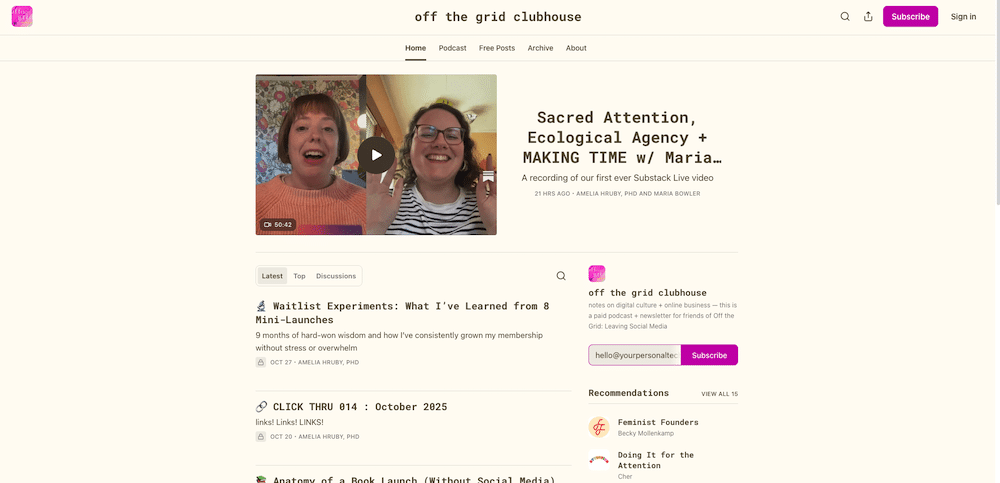
You can see that Dr. Amelia Hruby’s Substack profile has a home page with a hero section at the top, her latests posts, and recommendations, as well as tabs for her podcast, posts, and an about section.
Substack also allow you to offer paid subscriptions and gate premium content for paying members only. You can have an archive of free content alongside member-only content. It also has a built-in podcast platform, and the ability to recommend others on the platform.
Substack handles most of the technical setup for you, making it simple to start publishing. However, this simplicity comes with significant limitations if you want to do anything beyond publishing editorial content.
What is the downside of Substack for service-based business owners?
While there’s substantial controversy surrounding Substack’s very lax content moderation (as noted in The Atlantic’s investigation), we’re going to focus on the platform’s technical drawbacks.
But before we dive in, it’s important to note that I’m only familiar with Substack as a user and from having done some research on it previously and for this article.
That being said, my work is centered around email marketing strategy and supporting credentialed professionals marketing and selling their services and/or digital products. (Versus newsletter consulting, which is for people where their newsletter is the thing that that they’re selling.)
So that very much impacts the lens through which I look at Substack – and clearly I have a very particular bias.
With that in mind, let’s dive in.
Limited Ownership and Control
While you can export your subscribers from Substack – meaning, anyone who is subscribed you can download the move import them into a different newsletter/email marketing platform – you’re still renting space on someone else’s platform.
As Lex Roman, a newsletter strategist who’s written extensively about Substack, beehiiv, Ghost, and other newsletter platforms, points out in their article, “How Substack steals your audience and your revenue“:
“When you send your fans over to subscribe to your publication, they are not just joining your list, they are now joining the Substack userbase. Substack pushes your audience over to their app every chance they get.”
How this plays out:
- Readers might follow you on Substack without ever truly becoming your subscribers
- Many users turn off email notifications, meaning your content never reaches their inbox. Instead, they’d have to log into the Substack app or website to read your work
- You’re competing not just with other newsletter content, but with a feed of notes, direct messages, and other platform distractions
- Your content lives within Substack’s ecosystem
By contrast, with email marketing platforms such as Kit, you show up where your readers already spend a significant part of their day: their inbox. When someone subscribes, they’re opting in to hear from you, not joining another social platform.
Limited Ability to Welcome in New Subscribers
Substack only allows one welcome email when someone subscribes. And for some businesses owners, that’s totally fine! In fact, some people despise multiple onboarding sequences for new subscribers, but I personally prefer a 2-4 email series since this is when people are most excited to hear from.
While you can personalize that single email to some degree – Substack allows you to send a different email for free subscribers, paid subscribers, people you imported, and what they call “founding” members – you can’t personalize the experience for different subscribers beyond that.
For example, say Person A signs up for your Substack newsletter directly through your Substack page. By contrast, Person B comes in through a recommendation – and might not have even realized they opted in!
Those two people will still say the same initial email, despite the fact Person B could very well be there by mistake and could use a little reminder as how they got there (instead of possibly being pissed off that they’re subscribed to yet another newsletter that they didn’t sign up for).
In contrast, with Kit, you can send a hyperpersonlized welcome email to let new subscribers which specific newsletter recommended them!
Limited Ability to Market and Sell
If you’re considering Substack for more than just thought leadership, you need to understand this really significant limitation.
According to Substack’s own Content Guidelines:
“Substack is intended for high quality editorial content, not conventional email marketing. We don’t permit publications whose primary purpose is to advertise external products or services, drive traffic to third party sites, distribute offers and promotions, enhance search engine optimization, or similar activities.”
If your goal is to sell services, promote products, or grow your business beyond the newsletter itself, Substack isn’t designed for that – and it could get your account shut down.
(Though, from what I can tell, there are some ways around it.)
To be clear: it’s not that I’m anti-Substack (questionable morals aside). It’s that as an email marketing consultant, these are really significant when you’re doing email marketing!
Substack vs Kit: Feature Comparison
Now that we’ve covered some of Substack’s downsides, let’s dig into how these two platforms compare across key features that matter for your email strategy.
Discoverability
Substack has a robust recommendation system where publications can recommend each other, and new subscribers automatically receive suggestions for similar newsletters. According to Chenel Basilio of Growth in Reverse, some business owners have grown more than half their audience through Substack’s recommendations alone.
However, as Lex Roman shares:
“Substack’s analytics are lying to you about how many people found you here. Your best promotion is your fans and other publishers and those are all people, not platforms.”
Yikes!
While it’s not as robust or well-known as Substack’s recommendation engine, Kit also offers discoverability through their Creator Network feature, where Kit users can recommend others who use Kit, and readers can discover new newsletters.
(I personally have a love-hate relationship with Kit’s Creator Network. Depending on who recommends you, tou run the risk of getting subscribers who aren’t remotely in your target audience. Also, subscribers who come in through it tend to be less engaged than people who sign up directly on your website.)
Kit also has the Creator Profile, where you can create a public-facing page that showcases your content, includes an about section, and allows people to browse your published posts, similar to Substack:
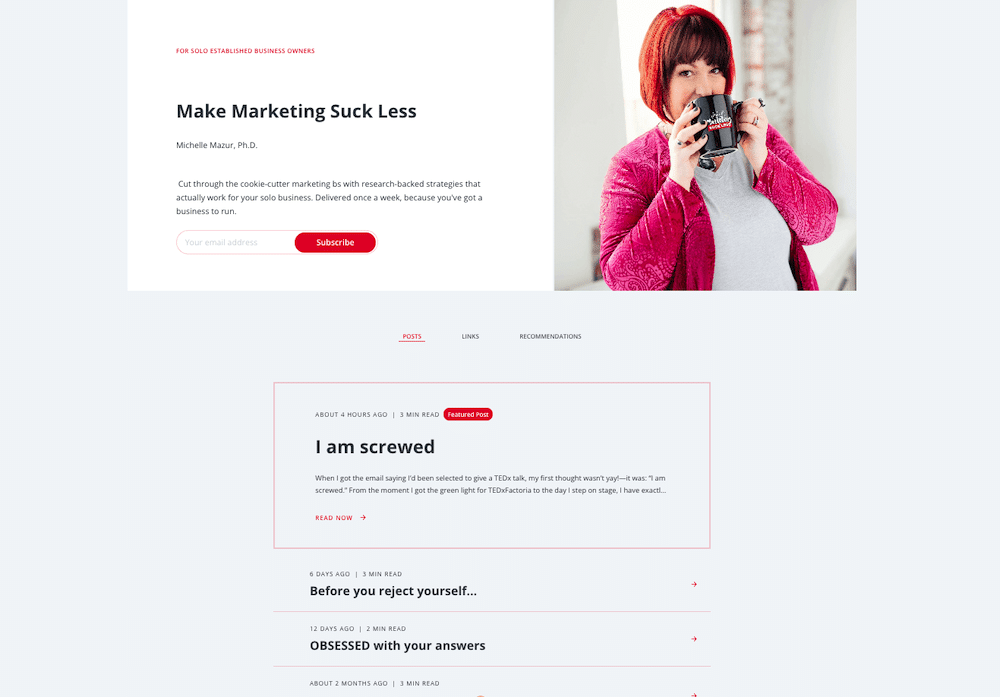
And as long as you choose to make your posts public, Kit creates archives of your past newsletters just like Substack. However, it does require checking an extra box when sending your newsletter.
Direct Communication
Substack allows for bi-directional communication, with writers and readers being able to have conversations with one another within the platform. You can also publicly comment on people’s newsletters. This can be a great way to engage directly with your audience.
With Kit, subscriber replies come directly to your inbox, so it’s more one-directional with you sharing information to your audience. So unless someone responds directly to your newsletter after it lands in their inbox, or you connect outside of your inboxes on social media, you’re limited in how you’re able to communicate with your subscirbers.
Monetization & Gated Content
Both platforms allow you to:
- Offer paid subscriptions
- Gate premium content for paying members only
- Maintain free archives alongside member-only content
- Build an audience before introducing paid tiers
Kit handles this through their Commerce feature, while Substack has it built into the core platform.
To be fair, Kit’s requires some technical setup on your hand to make this happen, whereas Substack handles this automatically on their end.
But, worth noting that Substack takes 10% of all paid subscription in addition to Stripe’s processing fees. As Chenell Basilio from Growth in Reverse notes:
“When you’re starting out, this might not seem like a lot. But as you grow it can become a huge chunk of change.”
By comparison, with Kit you keep 100% of your subscription revenue through their Commerce feature, minus Stripe’s processing fees.
Segmentation & Personalization
If you work with different types of clients or want to send targeted content to specific audience segments, you’re pretty limited with Substack. From what I can tell, you can only separate subscribers by paid vs free subscribers, as well as by their open rates. With his information, you have the ability to send somewhat targeted emails, for exampling sending a special offer to highly engaged subscribers who are on a free subscription.
Kit’s segmentation and personalization abilities are way more robust. Kit allows you to tag people based on their specific interests or actions they take. For example, if you’re running a promotion of a particular product or service, you can exclude people who are tagged as already having made that purchase. You can even take it one step further and allow people to opt-out of hearing through promotions.
Kit also allows you to personalize emails with subscriber-specific information. For example, my clients can book a Power Hour at a reduced rate. When I send out my weekly newsletter, they see that special link, whereas everyone else sees the regular link.
Automation & Sequences
Kit allows you to create automated email sequences based on behaviors such as signing up for a freebie, clicking on a link, or making a purchase, while Substack only offers a single welcome email when someone subscribes.
With Kit and many other email marketing softwares, you can:
- Set up welcome sequences and evergreen newsletters for new subscribers
- Create automated follow-ups based on subscriber actions
- Deliver digital products or courses automatically
- Create personalized subscriber journeys based on how they signed up
AI Integration
In May 2025, Kit released the Kit MCP, a feature that allows you to connect your Kit account to whatever AI software you use, such as Claude, ChatGPT, or Gemini. When you enable the MCP, you can do some pretty nifty things with it right from your AI tool, such as identifying who clicked on a link to your call-booking link in the last three months and tagging them, analyzing patterns in which subject lines led to higher opens, uncovering which types of links led to the most clicks, and even pushing a drafted email right into your broadcast. This feature is available on all paid Kit accounts, and it’s pretty straightforward to set up.
Personally, my favorite use for Kit’s MCP has been counting how many times a person clicks specifically on my services guide, which is something I would’ve previously been only able to do by manually going into each broadcast, checking on the click analytics, clicking on who clicked on that link and than tallying it up. Pretty handy!
As of the time of this writing, there is no official Substack MCP, unless you’re exceptionally tech-savvy (which is a level of expertise that’s way above my pay grade, and probably way more than a typical service provider would want to do).
I’ll also add, there are a lot of ethical concerns when it come to AI, especially when it comes to energy and water usage, and I personally wouldn’t rely solely on AI to write your email content. That being said, AI is the world we’re living in, and it’s pretty cool to see Kit offer such a robust tool for all its paid users.
Substack vs. Kit: Pricing
Admittedly, one of the benefits of Substack over Kit is pricing. Substack is free to use. Meaning, you can have unlimited subscribers and send unlimited emails for zero cost.
Kit, by contrast, is broken into three pricing structures: two free plans, the mid-tier Creator plan, and higher-priced Pro plan.
The two free plans are the legacy plan, which is free for under 1,000 subscribers, and includes unlimited landing pages and forms and unlimited emails, but no automations. On the free Newsletter plan, you can have under 10,000 subscribers and one simple automation, but the downside is your forced into recommending other Kit users of Kit’s choosing. And for many business owners who work with me, that just simply doesn’t jive with their business.
The paid plans are broken down by number of subscribers, and start at $39/month when paying monthly, or $33/month when paying annually for the Creator plan, and $66/month when paying annually or $79/month when monthly for the Pro plan.
Honestly, though, the Pro plan is overkill for most service-based business owners.
Substack vs Kit: Key Feature Comparison
Here’s a quick comparison table to show you how Kit and Substack compare. (Again, remember, this is from the perspective of someone who does email marketing specifically!)
| Feature | Kit (formerly ConvertKit) | Substack |
| Purpose | Email marketing tool built for selling | Newsletter platform for editorial content |
| Public Website/Profile | ✅ Yes (Creator Profile with archives) | ✅ Yes (mini-website with archives) |
| Discoverability | ✅ Yes (as long as you set up the Creator Network) | ✅ Yes |
| Community | ❌ No | ✅ Yes |
| Welcome Emails | ✅ Yes | ⚠️ Just one |
| Archives | ✅ Yes (but you most publicly publish your newsletter, which requires an extra step) | ✅ Yes |
| Segmentation | ✅ Yes | ❌ No |
| Paid Subscriptions | ✅ Yes | ✅ Yes |
| Gated Content | ✅ Yes | ✅ Yes |
| Selling Products/Services (Other than Newsletter) | ✅ Yes | ❌ No |
| Email Automations | ✅ Yes | ❌ No |
| AI Integration | ✅ Yes | ⚠️ Yes, but requires a lot of extra tech know-how |
Can You Use Kit and Substack Together?
Interestingly, some business owners have found creative ways to use both platforms together. The general approach is to use Substack as a discoverability and thought leadership channel, while using Kit for the actual marketing and selling.
How Robby Miles, a fellow Kit consultant who works specifically creators, approaches this with one of his clients:
“Substack is a discoverability channel, and Kit is the marketing channel. Once a month, she goes in, grabs the Substack list, uploads it to Kit, and everyone gets tagged as ‘Substack.’ She doesn’t send the newsletter to anybody who gets it through Substack – they already get it there. But for any marketing campaigns, launches, or promotions, that all happens in Kit because we have control over link tracking, segmentation, and all that.”
He adds: “It’s not any different than posting on YouTube. You post where the people are. And then the goal is: get on the newsletter, get into my marketing channels so I can actually start nurturing that relationship.”
Marissa Guthrie, a business coach for solopreneurs navigating the struggle between profit and purpose, explains her strategy:
“I use Kit as my sales platform, and Substack is more of a content ecosystem where I’m more present and active. Once a month, I upload my Substack list to Kit and make it very clear that they can unsubscribe if they choose to. If I’m doing a particular launch in Kit, I always send a consent email at the beginning saying if you want to unsubscribe from these launch emails, you can do so but still stay on my list.
The dynamic with people on Substack is different because I’m there and active every day in a way that I can’t be with Kit. I’ve got a dual growth strategy, which is great.
With Substack, I’m in conversation with my community more frequently, so I get a sense of what they need. With Kit, I don’t get that feedback loop, so I use my Substack community to inform my decisions about what content I share on Kit.”
The consensus from both: Substack works for discoverability and community engagement, but Kit is essential for actually running your business and marketing your services.
If you’re considering this dual approach, just know it requires:
- Regular manual work to sync your lists
- Clear communication about consent and why people are getting emails from both places
- Strategic thinking about what content goes where
- Acceptance that it’s not a perfect system
For most service-based business owners, this is more complexity than you need. But if you’re committed to thought leadership on Substack while also selling services, it’s a workable solution.
Kit vs. Substack: Summary
Kit is best for service-based business owners who need to send different content to different groups of people (e.g. clients vs. non-clients), automate their email marketing, and promote their services or products. You get full control over your list, robust automation capabilities, and the ability for people to sign up for different freebies, workshops, and raining.
Substack is best for writers and thought leaders where the newsletter itself is the product. You get built-in discoverability through recommendations, a simple publishing platform with community features, and payment processing for paid subscriptions. However, you cannot use it to market external services or products.
The key difference: Kit gives you the flexibility and control needed to run a service-based business, while Substack is designed purely for editorial content and thought leadership. If your newsletter supports your business (rather than being your business), Kit is the clear choice.
Cost consideration: Substack takes 10% of all paid subscription revenue plus Stripe fees, while Kit only charges Stripe fees (you keep 100% of your revenue).
Is Substack or Kit (formerly ConvertKit) a better platform for your service-based business?
As a Certified Kit Expert and email automation strategist, my recommendation for credentialed professionals selling their services and products, Kit is the better long-term choice.
Ultimately, this isn’t about one being “better” than the other.
It’s about understanding what you intend to do with your newsletter, and choosing the tool that’s actually designed for that purpose.
So if you’re focus is 100% on thought leadership and discoverability, Substack can be a fine choice.
But if you make your money primarily through selling you products and services, need the ability to send different emails to different groups of people, and want to be able to automate any aspect of your marketing, Kit is 100%, hands down the better option.
And if you’re looking for technical and strategic support with building an email setup that works without living inside of your Kit account, then learn about my done-for-You Kit & email marketing consulting services
I originally wrote a similar version of this post, Should You Use Substack For Your Author Newsletter?, for my friend Pauline Wiles’ website.